


Understanding Supplier Statuses and Tags
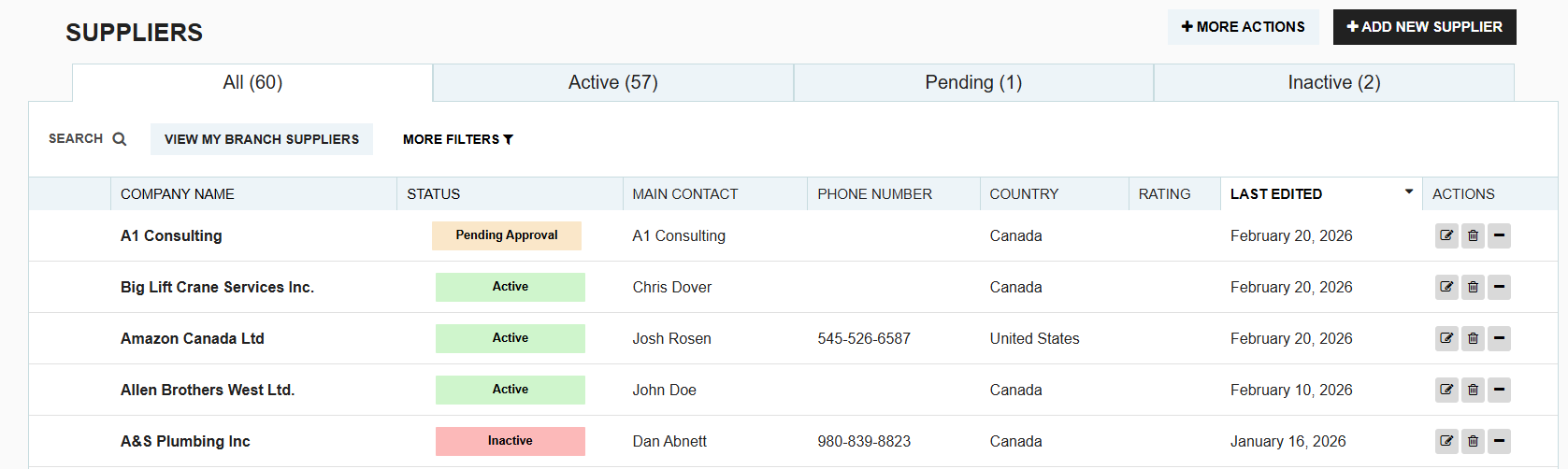
In your supplier listing page, the status column provides an immediate view of which vendors are eligible for procurement activities. Understanding these statuses is key to managing your vendor relationships and approval workflows.
Primary Statuses
Every supplier in Tradogram is assigned one of three core statuses that determine how they can be used in the system:
Active

The supplier is fully verified and ready for use. You can select this supplier when creating any transaction, such as Requisitions, Requests (RFQs), or Purchase Orders.
Inactive

The supplier is currently disabled for new transactions. They will not appear in dropdown menus when creating new orders, but all historical purchase data, contact details, and performance history are preserved.
Pending Review
The supplier has completed or updated their profile via the Supplier Self-Onboarding portal. This status indicates that the submitted vendor details are awaiting review before the profile can be activated.
Pending Approval

The supplier has passed review and is awaiting final internal approval. This status appears when Supplier Approvals are enabled in your account. Once an authorized admin reviews and approves the supplier, the status automatically moves to Active.
Reviewing & Activating Self-Onboarded Suppliers
When a supplier completes the self-onboarding form, their status automatically updates to Pending Review.
How the Review Process Works:
- Review Details: Open the supplier profile in Pending Review status. In the top corner, click the "Review & Activate" button.
- Permission Required: Any user with the permission to "Add/Edit Suppliers" can perform this review step.
What Happens Next?
- If Supplier Approvals are DISABLED: Completing the review will immediately move the supplier to Active status, making them available for transactions across the system.
- If Supplier Approvals are ENABLED: Completing the review submits the supplier for final internal approval, moving their status to Pending Approval. At this stage, a user with the "Approve Suppliers" permission must approve the profile to transition it to Active.
.webp)
.png)


