


What is the PO Mismatch tag on an invoice?
The PO Mismatch tag is a visual safety feature designed to help your accounts payable team quickly identify discrepancies between a supplier's invoice and the original Purchase Order. By flagging these differences, Tradogram helps prevent overpayment and ensures that billing aligns with your agreed-upon terms.
Visual Indicators
When you view your invoice listing or an individual document, you will see one of two icons:
- PO Match (Green): Indicates that all key data points on the invoice align perfectly with the associated Purchase Order.

- PO Mismatch (Red): Indicates that the system has detected a discrepancy that requires review before the invoice is finalized or pushed to your accounting system.
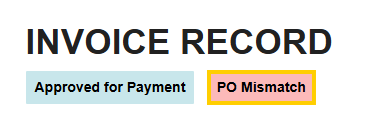
Top: Clicking the Match/Mismatch icon will highlight the specific mismatch for review.
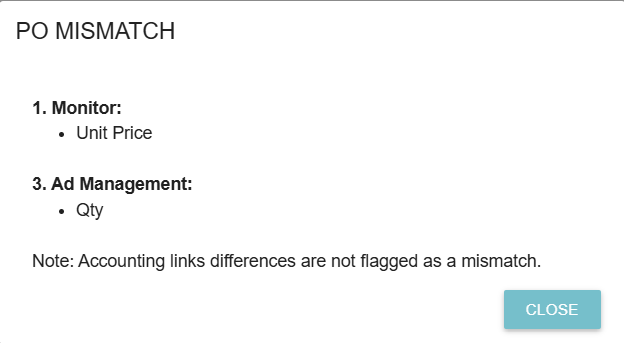
What Triggers a Mismatch?
The system automatically audits the invoice against the PO in two main areas:
1. Header-Level Discrepancies
These are high-level conflicts that often affect the entire document:
- Currency Codes: If the PO is in USD but the invoice is submitted in CAD.
- Supplier IDs: If the invoice is billed from a different supplier entity than the one listed on the PO.
- Due Dates: If the payment terms or due dates on the invoice differ from the PO terms.
2. Item-Level Discrepancies
These are specific conflicts found within the line items of the order:
- Quantities: If the supplier bills for more units than were ordered or received.
- Unit Prices: If the price per item on the invoice is higher than the price agreed upon in the PO.
- Unit Types: If there is a mismatch in the Unit of Measure (e.g., ordering in "Boxes" but being billed in "Each").
- Tax Details: If the applied taxes or tax rates differ from the original order.
- Delivery Dates: Discrepancies in when the items were expected versus when they were documented as arriving.
Why This Matters
The Mismatch tag acts as a "hard stop" for quality control. It ensures that any variance—whether it’s a simple data entry error or an unapproved price increase—is caught and resolved before the invoice is paid.
.webp)
.png)


